
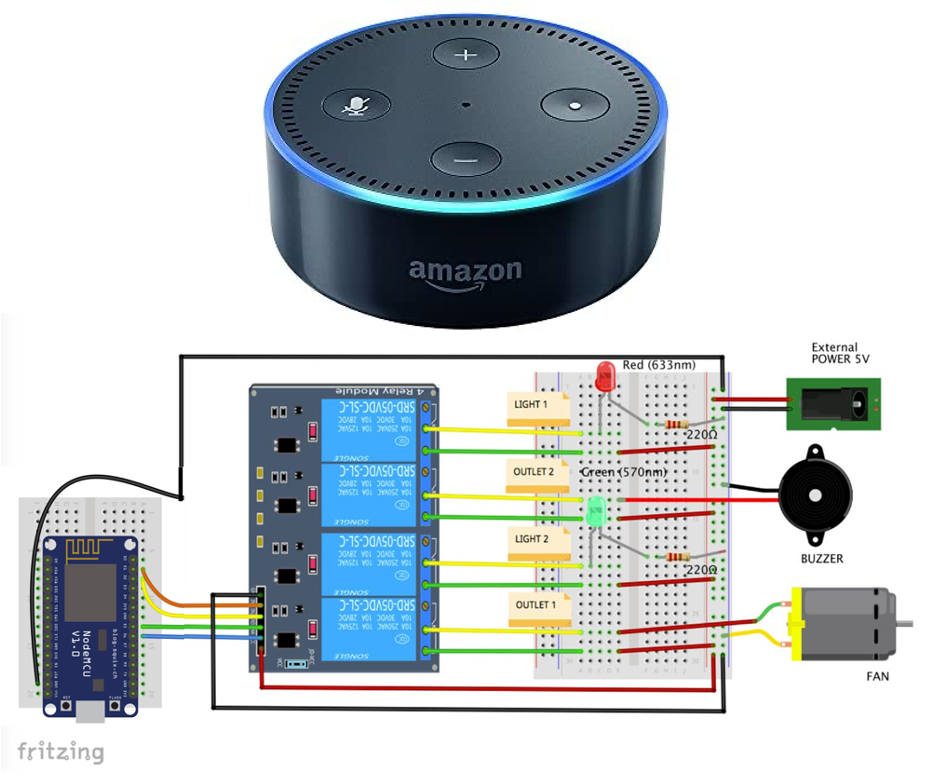
How to Set Up a Smart Home With Alexa. Imagine walking into your home and having the lights turn on automatically, your favorite music start playing, or even the temperature adjust just the way you like it—all without lifting a finger. Sounds amazing, right?
With Alexa, setting up a smart home is easier than you think. Whether you’re new to smart devices or want to make your life more convenient, this guide will show you exactly how to get started. By the end, you’ll have your home working for you in ways you never imagined.
Ready to make your home smarter and your days simpler? Let’s dive in!
Choosing The Right Alexa Device
Choosing the right Alexa device is the first step in building your smart home. Different devices offer unique features that suit various needs and spaces. Picking the best one helps you enjoy voice control, smart routines, and home automation smoothly.
Echo Dot Vs. Echo Show
The Echo Dot is small and affordable. It fits well in bedrooms or offices. It has great sound for its size and works well with Alexa commands.
The Echo Show has a screen. You can watch videos, make video calls, and see visual information. It is ideal for kitchens and living rooms where you want more interaction.
Choose Echo Dot for simple voice control and music. Pick Echo Show for added visuals and video features.
Compatibility Considerations
Check if your smart devices work with Alexa. Most smart lights, plugs, and locks support Alexa. Confirm compatibility on product labels or websites.
Some devices may need a hub or bridge to connect with Alexa. Make sure your home Wi-Fi is strong for smooth operation.
Plan your setup based on the devices you already have or want to buy. This keeps your smart home connected and easy to manage.
Setting Up Your Alexa Device
Setting up your Alexa device is the first exciting step toward creating a smart home that listens and responds to your needs. The process is straightforward, but a few key actions will ensure your device runs smoothly and connects properly. Let’s look at how to get your Alexa ready to assist you every day.
Connecting To Wi-fi
Your Alexa device needs a stable Wi-Fi connection to function. Without it, Alexa can’t access the internet or control your smart home devices.
To connect your device:
- Plug in your Alexa device and wait for the light ring to turn orange, indicating it’s in setup mode.
- Open your phone’s Wi-Fi settings and connect to the network named after your Alexa device.
- Return to the Alexa app to select your home Wi-Fi network and enter the password.
Think about your Wi-Fi signal strength in the area where you want Alexa. Is it strong enough to keep the connection steady? If not, moving the device closer to your router or adding a Wi-Fi extender can help.
Amazon Alexa App Installation
The Alexa app is your control center. It lets you customize settings, add new skills, and manage smart home devices.
To install the app:
- Go to the App Store or Google Play Store on your smartphone.
- Search for “Amazon Alexa” and download the app.
- Open the app and sign in with your Amazon account. If you don’t have one, creating an account takes just a few minutes.
Once logged in, the app will guide you through adding your Alexa device. The process includes naming your device and choosing your preferred language. Have you considered how giving Alexa a unique name might make your interactions more personal?
Connecting Smart Home Devices
Connecting smart home devices to Alexa creates a seamless control system. Alexa acts as a hub, allowing voice commands for many devices. Setting up devices is simple and fast with the Alexa app. Each device type has its own setup steps to follow. This guide covers smart bulbs, plugs, and thermostats.
Smart Bulbs And Lighting
Smart bulbs are easy to connect and control through Alexa. First, install the bulbs and power them on. Open the Alexa app and go to “Devices.” Tap “Add Device” and select “Light.” Follow the instructions to link the bulb’s app account or use Bluetooth. After setup, use voice commands like “Alexa, turn on the living room light.”
Smart Plugs And Outlets
Smart plugs let you control devices without replacing them. Plug the smart outlet into a wall socket, then connect your device. Open the Alexa app and add the plug as a new device. Use the plug’s app for initial setup if needed. Alexa can then turn devices on or off with simple commands.
Smart Thermostats
Smart thermostats provide easy temperature control through Alexa. Install the thermostat following the manufacturer’s guide. In the Alexa app, add the thermostat under “Thermostats.” Link your thermostat account for full control. Ask Alexa to set the temperature, check the current heat, or change modes.
Creating Routines And Automations
Creating routines and automations with Alexa transforms your smart home into a seamless, responsive environment. These routines allow you to link multiple actions to a single command or schedule, saving you time and effort throughout the day. Whether you want to streamline your mornings or wind down at night, setting up personalized automations can make your home truly work for you.
Morning Routine Setup
Start your day with a routine that sets the tone for productivity and comfort. You can program Alexa to gradually brighten your smart lights, read out the weather forecast, and play your favorite news podcast—all triggered by a simple phrase like “Alexa, good morning.”
Think about adding specific actions tailored to your habits, such as:
- Turning on the coffee maker with a smart plug
- Adjusting the thermostat to your preferred temperature
- Opening smart blinds to let in natural light
What if your morning routine could help you avoid rushing out the door? With Alexa, you can even have it remind you about appointments or daily tasks as part of your wake-up routine.
Nighttime Automation Ideas
Automations for the evening help you relax and prepare for restful sleep. Alexa routines can dim your lights, lock the doors, and play soothing sounds—all activated by a voice command like “Alexa, good night.”
Consider including these actions in your nighttime setup:
- Turning off all unnecessary electronics with a single command
- Setting your thermostat to an optimal sleep temperature
- Activating security cameras or alarm systems
Imagine how much easier it is to settle down when your home adjusts automatically. Have you thought about what automations could reduce your stress before bed?
Voice Commands And Skills
Using voice commands and Alexa Skills is key to making your smart home truly smart. Alexa listens to your requests and acts on them instantly, saving you time and effort. Understanding how to use basic voice commands and enable new skills can transform your daily routine.
Basic Voice Commands
Start with simple commands like “Alexa, turn on the lights” or “Alexa, set the thermostat to 72 degrees.” These basic instructions help you control your smart devices without lifting a finger.
Try asking Alexa about the weather, news updates, or setting reminders. You’ll find these commands quick and reliable for everyday tasks.
Have you tried customizing your commands? For instance, saying “Alexa, good morning” can trigger multiple actions, like turning on lights and reading your calendar. This shows how versatile voice control can be.
Enabling Alexa Skills
Alexa Skills are like apps that add new features to your device. You can enable Skills for everything from ordering food to controlling smart gadgets.
To enable a Skill, open the Alexa app, search for the Skill you want, and tap “Enable.” Some popular Skills include smart home controls, cooking assistants, and fitness trackers.
Think about what you need most at home. Do you want a Skill to help with grocery lists or one that plays relaxing sounds? Adding Skills tailored to your lifestyle makes Alexa more useful every day.
Troubleshooting Common Issues
Setting up a smart home with Alexa can be exciting, but sometimes things don’t go as smoothly as planned. Troubleshooting common issues is part of the process and knowing how to tackle them will save you time and frustration. Let’s look at some typical problems and how you can fix them effectively.
Wi-fi Connectivity Problems
Your Alexa device relies heavily on a strong Wi-Fi connection. If Alexa suddenly stops responding or can’t connect to the internet, your Wi-Fi might be the culprit.
Start by checking if other devices in your home are connected to the Wi-Fi. If they’re not, try restarting your router. Sometimes, simply unplugging the router for 30 seconds and plugging it back in can refresh your network.
Make sure your Alexa device is within range of the router. Thick walls or interference from other electronics can weaken the signal. If your device is too far, consider moving it closer or using a Wi-Fi extender.
- Restart your router and Alexa device.
- Check for router firmware updates.
- Reduce the number of devices connected to your Wi-Fi.
Have you ever noticed Alexa working perfectly in one room but struggling in another? That’s usually a Wi-Fi strength issue. Testing your signal strength with a smartphone app can help pinpoint weak spots.
Device Compatibility Issues
Not all smart devices work seamlessly with Alexa. Sometimes, the device you want to control may not be fully compatible or might require extra setup steps.
Before buying new devices, check if they support Alexa integration. Look for the “Works with Alexa” label or check the manufacturer’s website.
Some devices need you to enable their Alexa skill through the Alexa app. This step is often missed but is crucial for proper control.
- Ensure your smart device firmware is up to date.
- Enable the device’s Alexa skill in the Alexa app.
- Link your device’s account to Alexa if required.
Have you ever tried to add a device only to find Alexa doesn’t recognize it? This is a common sign of compatibility issues. Sometimes, checking online forums can reveal workarounds or unofficial skills that might help.
Enhancing Security And Privacy
Enhancing security and privacy is crucial when setting up a smart home with Alexa. Protecting your personal data helps maintain your family’s safety. It also ensures that your smart devices respond only to you and trusted users.
Alexa offers tools to control access and manage data. These features help you customize security based on your needs. Taking the time to set up these options creates a safer smart home environment.
Setting Up Voice Profiles
Voice profiles let Alexa recognize each person’s voice. This feature personalizes responses and controls access to sensitive information. Setting up voice profiles helps prevent unauthorized use of your devices.
To create a voice profile:
- Open the Alexa app and go to Settings.
- Select Your Profile & Family.
- Choose Add a Voice Profile and follow the instructions.
Once set, Alexa can distinguish who is speaking. It adjusts responses based on the speaker’s profile. This adds a layer of security to your smart home.
Managing Privacy Settings
Alexa allows you to control what data is collected and stored. Regularly review privacy settings to keep your information safe. You can delete voice recordings and limit data sharing.
Key privacy controls include:
- Reviewing and deleting voice history.
- Choosing what information Alexa can access.
- Enabling or disabling features like drop-in calls.
Access these settings in the Alexa app under Privacy. Adjusting these options helps you maintain control over your smart home data.


Frequently Asked Questions
How Do I Connect Alexa To Smart Home Devices?
To connect Alexa, open the Alexa app and go to Devices. Tap “Add Device” and select your smart device brand. Follow the on-screen instructions to complete the setup. Ensure your smart device is powered on and connected to Wi-Fi for seamless integration.
What Smart Home Devices Work Best With Alexa?
Alexa supports smart lights, thermostats, plugs, cameras, and locks. Popular brands include Philips Hue, Nest, Ring, and TP-Link. Choose devices compatible with Alexa for easy voice control and automation, enhancing your smart home experience efficiently.
Can Alexa Control Smart Home Devices Remotely?
Yes, Alexa can control devices remotely via the Alexa app. You can manage lights, locks, and thermostats from anywhere. Ensure your smart devices and Alexa app have internet access for remote functionality and real-time control.
How Do I Create Routines With Alexa?
In the Alexa app, go to Routines and tap “Create Routine. ” Set a trigger, such as a voice command or schedule. Add actions like turning on lights or adjusting thermostats. Save to automate multiple smart devices simultaneously for convenience.
Conclusion
Setting up a smart home with Alexa can be simple and fun. Start with basic devices like smart bulbs or plugs. Alexa helps control your home with just your voice. Customize your settings to fit your daily routine. Enjoy convenience, safety, and energy savings every day.
Small steps make a big difference. Explore and add more devices as you feel comfortable. Your smart home journey begins now.