

Imagine walking into your home and having the lights turn on automatically, your favorite music start playing, and the temperature adjust just the way you like it. Sounds amazing, right?
Setting up a smart home can make your daily life easier, safer, and more enjoyable. In this guide, you’ll discover simple steps to transform your living space with smart technology—no tech skills needed. Ready to take control of your home and experience true convenience?
Keep reading, because your smart home journey starts here.
Choosing The Right Smart Devices
Choosing the right smart devices is key to creating a home that truly fits your lifestyle. The market is packed with gadgets promising convenience, but picking what actually adds value can be tricky. You want devices that solve your daily challenges, not just shiny tech that ends up unused.
Identify Your Needs
Start by thinking about what you want to improve in your home. Are you looking for better security, energy savings, or simply more comfort? Pinpointing your goals helps narrow down the overwhelming options.
Consider the rooms you spend the most time in. For example, if mornings are hectic, a smart coffee maker or automated blinds could make a big difference. If you worry about safety, a smart doorbell or security camera might be your priority.
Ask yourself how much control you want from your phone or voice assistant. Do you prefer simple on/off commands, or detailed automation that adjusts settings based on time or presence? Your answers will guide which devices fit your habits best.
Popular Smart Home Gadgets
Some gadgets have proven their worth through popularity and user satisfaction. Here’s a quick look at common smart home devices that many find useful:
- Smart Speakers:Devices like Amazon Echo or Google Nest allow hands-free control of other smart devices and provide instant information or entertainment.
- Smart Lights:Philips Hue and similar bulbs let you adjust brightness and color, saving energy and setting moods effortlessly.
- Smart Thermostats:Nest or Ecobee learn your schedule and adjust heating or cooling, lowering utility bills while keeping you comfortable.
- Smart Security Cameras:Ring and Arlo offer remote monitoring, motion alerts, and two-way communication to keep your home safe.
- Smart Locks:August and Schlage let you lock or unlock doors remotely, perfect for granting access to guests or service providers without keys.
Which devices do you find yourself reaching for the most? Sometimes, starting with one or two reliable gadgets can reveal what else would enhance your smart home experience. Avoid buying everything at once; let your setup grow naturally as your needs evolve.

Setting Up A Smart Hub
Setting up a smart hub is a key step in creating a smart home. The smart hub acts as the central control point for all your devices. It allows different gadgets to communicate and work together smoothly. This makes managing your smart home easy and efficient.
Understanding Smart Hubs
A smart hub connects various smart devices in your home. It supports communication protocols like Wi-Fi, Zigbee, or Z-Wave. This helps devices from different brands work together. The hub processes commands and automates tasks based on your preferences.
Without a smart hub, you might control devices individually. This can be slow and confusing. A hub simplifies control by uniting all devices on one platform. You can use an app or voice assistant to manage everything.
Selecting The Ideal Hub For Your Home
Choose a hub that fits your home size and devices. Check compatibility with your existing smart gadgets. Popular hubs include Amazon Echo, Google Nest Hub, and Samsung SmartThings.
- Consider the number of devices your hub can support.
- Look for easy setup and user-friendly apps.
- Check if the hub supports your preferred voice assistant.
- Think about future expansion and device compatibility.
Pick a hub that matches your needs and budget. This ensures smooth smart home control and room to grow.
Integrating Smart Lighting
Integrating smart lighting transforms your home’s atmosphere and improves energy use. Smart lights give control over brightness, color, and timing. They can work with voice assistants or apps. This section explores types of smart bulbs and how to install and control them.
Types Of Smart Bulbs
Smart bulbs come in several styles to fit different needs:
- Wi-Fi Bulbs:Connect directly to your home network. No extra hub needed.
- Bluetooth Bulbs:Controlled via nearby devices. Best for small areas.
- Zigbee/Z-Wave Bulbs:Require a hub but offer strong connections. Ideal for larger setups.
- Color Changing Bulbs:Change colors and shades. Great for mood lighting.
- Dimmable Bulbs:Adjust brightness for comfort and energy savings.
Installation And Control
Installing smart bulbs is simple. Replace your old bulbs with smart ones. Ensure the power is off before swapping bulbs.
Control options include:
- Mobile Apps:Adjust settings from anywhere in your home.
- Voice Assistants:Use commands with Alexa, Google Assistant, or Siri.
- Smart Switches:Control multiple bulbs from one place.
- Automation:Set schedules or triggers for lights to turn on/off.

Smart Thermostat Installation
Installing a smart thermostat is a key step in creating a smart home. It helps control your home’s temperature easily and saves energy. A smart thermostat learns your schedule and adjusts heating and cooling automatically. This makes your home comfortable while lowering utility bills.
Benefits Of A Smart Thermostat
- Reduces energy consumption by adjusting temperature smartly.
- Allows remote control through a smartphone or tablet.
- Provides detailed energy usage reports for better management.
- Integrates with other smart home devices for seamless automation.
- Improves comfort by learning your daily routines and preferences.
- Offers easy scheduling to match your lifestyle.
Step-by-step Installation Guide
Turn off your heating and cooling system at the breaker. Remove the old thermostat carefully and note the wiring colors and labels. Use the new smart thermostat’s manual to match wires correctly.
Attach the new thermostat’s base to the wall with screws. Connect the wires to the matching terminals on the smart thermostat. Ensure all connections are secure and properly placed.
Mount the smart thermostat display onto the base. Turn the power back on at the breaker. Follow the on-screen instructions to connect the thermostat to your Wi-Fi network.
Set up the thermostat using the app on your phone. Configure temperature preferences and schedules to fit your daily routine. Test the system by adjusting the temperature remotely to confirm proper operation.
Enhancing Security With Smart Devices
Enhancing security with smart devices transforms your home into a safer place. These devices offer real-time protection and control. They help monitor your property and alert you to any unusual activity. Smart security tools are easy to install and use. They provide peace of mind whether you are home or away.
Smart Locks And Cameras
Smart locks replace traditional keys with digital access. You can lock or unlock doors using a phone app. These locks allow temporary access for guests or service workers. Smart cameras capture video footage day and night. Many models offer two-way audio to communicate remotely. Cameras often include motion detection to spot movement quickly.
Monitoring And Alerts
Smart security systems send instant alerts to your phone. You receive notifications about door activity or suspicious motions. Some systems include integration with alarm systems or emergency services. Monitoring apps let you view live video and control devices anywhere. Alerts help you respond quickly to potential threats and keep your home safe.
Automating Home Entertainment
Automating your home entertainment can transform how you enjoy movies, music, and games. Instead of juggling multiple remotes and apps, you create a system that responds to your voice or a single tap. This not only simplifies your setup but also enhances your relaxation time.
Smart Tvs And Speakers
Smart TVs are the cornerstone of automated entertainment. They connect to your Wi-Fi and let you stream shows without extra devices. Pairing your TV with smart speakers gives you voice control over volume, channel changes, and content search.
Consider devices like Amazon Echo or Google Nest paired with a Samsung or LG Smart TV. They let you say commands like, “Play the latest episode of my favorite show,” and the system does the rest. You can even control multiple rooms with synchronized speakers, creating a whole-house audio experience.
Creating A Seamless Experience
To make your entertainment truly seamless, link your smart TV and speakers to a central hub or app. This way, you can start a movie on the living room TV and continue listening to the audio in the kitchen without missing a beat.
Set up routines that match your habits. For example, a “Movie Night” routine could dim the lights, close the blinds, turn on your smart TV, and adjust the speaker volume with a single command. Have you tried setting up custom routines that fit your lifestyle yet?
- Use a universal remote app to control all devices from your phone.
- Integrate your entertainment system with other smart home elements like lighting and thermostat.
- Test voice commands frequently to fine-tune responses and improve convenience.
Automating entertainment is about making technology work quietly in the background so you can focus on enjoying the moment.
Voice Assistants And Control
Voice assistants have become the heart of smart homes. They let you control devices using just your voice. This makes managing your home easier and faster. Voice control lets you adjust lights, play music, and check weather without lifting a finger.
These assistants connect with many smart devices. You can create a seamless experience by linking your speakers, thermostats, and cameras. Voice control helps simplify daily tasks and saves time.
Popular Voice Assistants
- Amazon Alexa: Works with many smart devices and offers thousands of skills.
- Google Assistant: Great for answering questions and integrates well with Google services.
- Apple Siri: Best for Apple users and connects with HomeKit-enabled devices.
- Microsoft Cortana: Useful for Windows users and integrates with Microsoft apps.
Commands And Routines
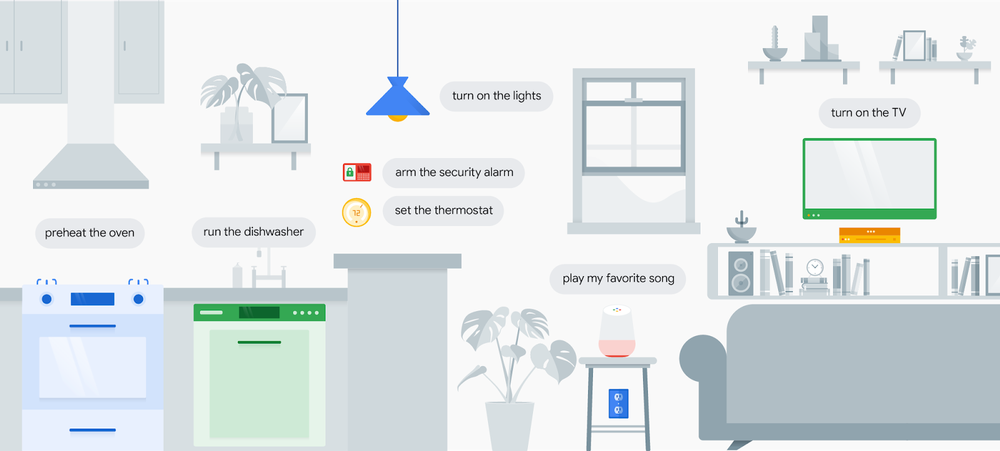
Voice commands let you control devices quickly. Say simple phrases like “turn on the lights” or “set the thermostat to 72.” Commands work best when clear and direct.
Routines combine multiple actions into one command. For example, saying “Good morning” can turn on lights, read news, and start the coffee maker. Set routines in the assistant’s app for a personalized experience.
- Create routines for daily schedules like waking up or going to bed.
- Use voice commands to control multiple devices at once.
- Customize routines to match your lifestyle and preferences.
Managing Energy Consumption
Managing energy consumption is a key part of setting up a smart home that saves you money and reduces waste. With smart technology, you gain control over how much energy your devices use and when they run. This not only cuts down your bills but also helps you understand your household’s power habits.
Smart Plugs And Outlets
Smart plugs and outlets let you control devices remotely using your smartphone or voice commands. You can turn off lights, fans, or appliances that are accidentally left on without having to get up. Some smart plugs even let you schedule when devices turn on or off, so you only use energy when needed.
Imagine coming home and your coffee maker starts brewing automatically, but only during morning hours. This saves energy compared to leaving it plugged in all day. Have you ever thought about how much power your unused gadgets consume just by being plugged in?
Monitoring Usage
Energy monitoring tools track your electricity use in real time. They provide detailed reports showing which devices use the most power and at what times. This insight helps you make smarter decisions about when to run heavy appliances.
You might notice that your old refrigerator consumes more energy than newer models, prompting a timely upgrade. Monitoring also highlights habits that increase your bills, like leaving lights on in empty rooms. Are you ready to see exactly where your energy goes and find easy ways to reduce it?
Troubleshooting Common Issues
Setting up a smart home can sometimes feel like solving a puzzle, especially when things don’t work as expected. Troubleshooting common issues helps you keep your devices running smoothly without frustration. Let’s look at two key areas where problems often arise and how you can fix them quickly.
Connectivity Problems
Connectivity issues are the most frequent hurdle in smart home setups. If your devices aren’t responding, check your Wi-Fi signal strength first. Weak signals can cause delays or disconnections.
Try these tips to improve your connection:
- Move your router closer to your smart devices or use Wi-Fi extenders.
- Restart your router regularly to clear temporary glitches.
- Check for interference from other electronics like microwaves or cordless phones.
- Ensure your network isn’t overloaded with too many devices at once.
Have you noticed that some devices perform better on 2.4 GHz than 5 GHz Wi-Fi? Experiment with switching bands to see which one provides more stable connections.
Device Compatibility
Not all smart devices speak the same language. Compatibility issues can stop your smart home from working as a single unit. Before buying, confirm that new devices support your home’s platform, such as Alexa, Google Home, or Apple HomeKit.
If you already own multiple brands, consider these points:
- Use hubs or bridges to connect devices that otherwise can’t communicate.
- Update device firmware regularly to fix bugs and add compatibility.
- Check app permissions and settings to ensure devices are properly linked.
What’s your experience with mixing brands? Sometimes, sticking to one ecosystem saves headaches, but mixing can offer more options if you manage it well.
Ensuring Privacy And Security
Setting up a smart home brings many benefits but also new risks. Devices connect to the internet and share data. This makes privacy and security very important. Protecting your smart home ensures your information stays safe. It also keeps hackers out of your network. Simple steps can greatly reduce risks and give peace of mind.
Protecting Your Network
Your home network is the heart of your smart home. Secure it to stop unauthorized access. Use a strong password for your Wi-Fi. Avoid common words or simple number sequences. Change the default router login details immediately.
Enable network encryption, like WPA3 or WPA2. This scrambles the data sent over your Wi-Fi. Turn off features you do not use, such as remote management. Regularly update your router’s firmware to patch security flaws.
Consider creating a separate network for smart devices. This limits access to your main devices like computers and phones. It also adds a layer of protection if one device is compromised.
Safe Usage Practices
Be careful about the information shared with smart devices. Avoid using personal details as device names or passwords. Review privacy settings in device apps to control data sharing.
Keep software and apps updated to fix security weaknesses. Use two-factor authentication if available. This requires a second step to verify your identity.
Disconnect devices when not in use for long periods. Be cautious with voice assistants; they may listen unintentionally. Regularly check for unusual device behavior that could signal hacking.
Frequently Asked Questions
What Devices Do I Need To Start A Smart Home?
To start a smart home, you need a smart hub, smart lights, smart thermostats, and smart security cameras. These devices connect through Wi-Fi or Zigbee and offer automation and remote control via apps.
How Do I Secure My Smart Home Network?
Secure your smart home by using a strong Wi-Fi password, enabling two-factor authentication, and updating device firmware regularly. Also, isolate smart devices on a separate network to minimize hacking risks.
Can I Control My Smart Home Remotely?
Yes, most smart home systems allow remote control via smartphone apps. You can manage lights, thermostats, and security devices from anywhere with an internet connection.
Is Voice Control Necessary For A Smart Home?
Voice control is optional but convenient. It allows hands-free operation through assistants like Alexa, Google Assistant, or Siri. Voice commands enhance accessibility and ease of use.
Conclusion
Setting up a smart home can make life easier and more fun. Start with simple devices and add more over time. Choose gadgets that fit your needs and budget. Keep your network safe to protect your privacy. Enjoy the convenience of controlling your home with a tap or voice.
Smart homes save time and energy every day. Try it step by step, and soon your home will feel smarter and more comfortable. Small changes bring big benefits. Your smart home journey begins now.