
Do you want to make your home smarter but don’t know where to start? Imagine controlling your lights, thermostat, and security with just your voice or a tap on your phone.
It’s easier than you think, and the benefits go beyond just convenience. A smart home can save you money, keep your family safer, and make daily tasks simpler. You’ll discover practical steps to transform your house into a smart home without the hassle or high costs.
Ready to unlock the full potential of your living space? Let’s dive in.
Benefits Of A Smart Home
Making your home smart brings a range of benefits that go beyond just convenience. It can improve your daily life in ways you might not expect, from saving money to enhancing security. Understanding these benefits can help you decide which smart devices to add first and how to get the most out of your smart home setup.
Energy Efficiency And Cost Savings
Smart homes help you save energy by automatically adjusting lights, heating, and cooling based on your habits. For example, a smart thermostat learns when you’re home and lowers the temperature when you’re away, cutting down your electricity bill.
Have you ever forgotten to turn off lights? Smart bulbs can be controlled remotely or scheduled to switch off, preventing wasted energy. These small changes quickly add up to noticeable savings.
Enhanced Security And Peace Of Mind
Smart security cameras and doorbells let you monitor your home from anywhere using your phone. This means you can check who’s at the door or review footage anytime, even when you’re away on vacation.
With smart locks, you don’t need to worry about lost keys. You can grant temporary access to guests or service workers and revoke it instantly. How much easier would that make your life?
Improved Comfort And Convenience
Imagine waking up to your coffee brewing automatically and your blinds opening to let in natural light. Smart home devices can create routines that match your lifestyle, making daily tasks easier.
Voice assistants allow you to control devices hands-free, which is especially handy when you’re cooking or busy. What tasks in your home would you like to automate?
Better Home Management And Integration
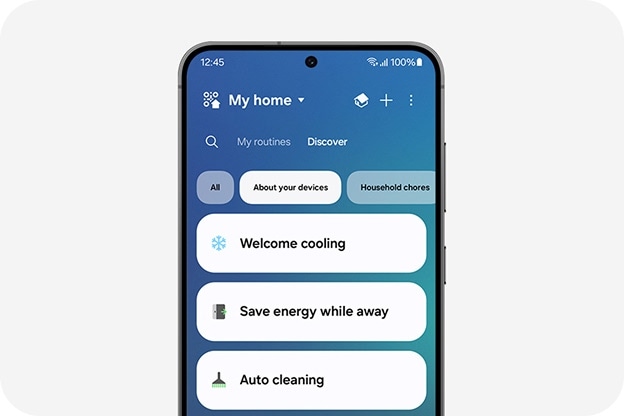
Smart home hubs and apps put control of all your devices in one place. You don’t need to juggle multiple apps or remotes, which simplifies managing your home’s technology.
Devices can work together—for example, your smart lights can flash if your security alarm is triggered. This integration adds layers of safety and convenience that standalone devices can’t offer.
Assessing Your Home’s Needs
Assessing your home’s needs is the first crucial step toward making it smart. You can’t just add gadgets randomly and expect everything to work seamlessly. Understanding what you want to achieve helps you choose the right devices and systems that fit your lifestyle and budget.
Think about what frustrates you the most at home. Is it forgetting to turn off the lights? Or maybe you want better security while you’re away? Pinpointing these pain points will guide your decisions and make your smart home upgrades truly meaningful.
Identifying Key Areas For Automation
Look around your home and list areas where automation can bring convenience. Common spots include lighting, security, climate control, and entertainment systems.
Ask yourself questions like:
- Do you want lights to turn on automatically when you enter a room?
- Would a smart thermostat help reduce your energy bills?
- Is monitoring your front door important when you’re not home?
Focusing on these areas ensures you invest in technology that improves your daily life instead of just adding complexity.
Evaluating Your Current Technology Setup
Check what devices you already have and see if they can connect with smart technology. Some products like smart speakers or Wi-Fi routers can serve as hubs for other smart devices.
Also, consider your home’s internet speed and Wi-Fi coverage. Smart devices rely heavily on a stable connection, so weak spots can cause frustration.
Knowing your existing setup saves you money and effort by avoiding unnecessary purchases or upgrades.
Setting A Realistic Budget And Priorities
Decide how much you want to spend and which features matter most to you. Smart home tech can vary from affordable bulbs to expensive home automation systems.
It’s easy to get carried away with fancy gadgets, but focusing on what solves your problems first is smarter.
For example, investing in a smart lock might be more urgent than a voice-controlled coffee maker if security is your main concern.
Choosing The Right Smart Devices
Choosing the right smart devices shapes the foundation of a smart home. Devices must match your daily needs and lifestyle. Compatibility with your existing gadgets is essential. Ease of use and reliability also play key roles. Think about the areas in your home that need the most improvement. Prioritize devices that save energy and increase comfort. Focus on simple, effective technology that anyone can use. This guide covers popular smart devices to help you decide.
Smart Lighting Solutions
Smart lighting offers control and convenience. Adjust brightness and color with a tap or voice command. Schedule lights to turn on or off automatically. Save energy by setting timers or using motion sensors. Choose bulbs that fit your fixtures and support your smart system. Look for options with easy installation and good app control. Smart lighting improves mood and adds security by simulating presence.
Smart Security Systems
Smart security devices protect your home day and night. Cameras, sensors, and alarms connect to your phone. Receive alerts instantly if something is wrong. Some systems include smart locks to control door access remotely. Choose devices with clear video quality and reliable alerts. Look for easy setup and good customer support. Smart security helps you feel safe and keeps your home monitored.
Smart Thermostats
Smart thermostats control your home temperature efficiently. Program heating and cooling to match your schedule. Save money by reducing energy use when you are away. Many models learn your habits and adjust automatically. Control your thermostat from anywhere using a smartphone app. Choose a model compatible with your heating system. Smart thermostats increase comfort and reduce utility bills.
Smart Speakers And Assistants
Smart speakers serve as the brain of your smart home. Use voice commands to control devices hands-free. Play music, get news updates, or set reminders easily. Choose a speaker that supports your preferred smart home platform. Look for clear sound and good microphone sensitivity. Some models connect with many smart devices for seamless control. Smart assistants simplify tasks and keep your home connected.
Setting Up A Smart Hub
Setting up a smart hub is a key step to making your home smart. It acts as the central control point for all your smart devices. With a smart hub, you can manage lights, locks, cameras, and more from one place. This setup makes your home technology easier to use and more efficient.
Understanding Smart Hubs
A smart hub connects various smart devices and lets them work together. It uses wireless signals like Wi-Fi, Zigbee, or Z-Wave to communicate. This means you control everything using a single app or voice commands. Some hubs also support automation, setting routines for daily tasks. For example, lights can turn on automatically when you enter a room.
Choosing the right hub depends on the devices you want to connect. Compatibility is important to avoid issues later. Most hubs offer easy setup and simple controls. They help reduce clutter by replacing multiple remote controls or apps.
Popular Smart Hub Options
- Amazon Echo Plus:Integrates Alexa voice control and supports Zigbee devices.
- Samsung SmartThings Hub:Works with many smart brands and offers strong automation features.
- Google Nest Hub:Combines Google Assistant with a touchscreen for easy control.
- Apple HomePod Mini:Best for users in the Apple ecosystem with Siri voice commands.
Each hub has strengths in device compatibility and control methods. Check which devices you already own or plan to buy. This helps pick the hub that fits your smart home needs best.
Integrating Smart Devices
Integrating smart devices into your home creates a connected environment that makes daily tasks easier and more efficient. It’s not just about adding gadgets but ensuring they work together smoothly. This part of making your home smart focuses on how to bring different devices into one system.
Choosing Compatible Devices
Start by checking if your devices can talk to each other. Many smart devices use platforms like Google Home, Amazon Alexa, or Apple HomeKit. Picking devices that support the same platform means you can control everything from one app or voice assistant.
Think about your needs first. Do you want smart lights, security cameras, or a thermostat? Make a list and then see which brands and models fit your preferred platform. This saves you from frustration later when devices don’t connect properly.
Setting Up A Central Hub
A central hub acts like the brain of your smart home. It connects all your devices and lets you manage them easily. Some hubs are physical devices, while others are apps on your phone or tablet.
I once tried managing my smart lights and thermostat separately, which became confusing. Adding a hub simplified control and saved time. You might find a hub useful if you have many devices, but for fewer gadgets, using a single app might work fine.
Creating Automation Rules
Automation makes your smart home truly smart. You can program devices to act based on certain triggers, like turning on lights when you enter a room or adjusting the thermostat when you leave.
Start with simple actions to see what fits your lifestyle. Maybe have your coffee maker start brewing when your morning alarm goes off. Ask yourself: What repetitive tasks would you like your home to handle automatically?
Ensuring Network Security
Smart devices connect to your Wi-Fi, so your home network security matters. Use strong passwords and update device firmware regularly to protect your privacy.
Consider setting up a separate network for your smart devices. This limits risks if one device gets hacked and keeps your main devices safer.
Testing And Adjusting Your Setup
After integrating devices, spend time testing how they work together. Sometimes, you’ll find delays or conflicts that need fixing. Don’t hesitate to tweak settings or swap out devices that don’t meet your expectations.
Remember, your smart home should make life easier, not more complicated. Keep adjusting until it feels natural and helpful to you.
Ensuring Device Compatibility
Ensuring device compatibility is a key step in creating a smooth smart home setup. Devices from different brands may not always work well together. This can lead to frustration and wasted money. Understanding compatibility helps avoid these issues and ensures your smart home runs smoothly.
Choosing devices that speak the same language is important. This means they use the same communication protocols like Wi-Fi, Zigbee, or Z-Wave. Devices using the same protocol can easily connect and work as a team.
Check Supported Platforms And Hubs
Many smart devices need a central hub or app to control them. Check which hubs or platforms your devices support. Popular platforms include Amazon Alexa, Google Home, and Apple HomeKit. Devices compatible with these platforms offer easier control and integration.
Look For Interoperability Certifications
Some devices have certifications showing they work well with others. For example, look for “Works with Alexa” or “Works with Google Assistant” labels. These tags confirm that the device can connect with your existing smart home system.
Use A Compatibility Checklist
Create a list of all devices you want to use. Check each device’s compatibility with your main hub and other devices. This helps avoid surprises and ensures everything connects properly before buying.
Consider Future Expansion
Plan for adding new devices later. Choose brands and platforms known for broad compatibility. This way, your smart home can grow without replacing existing gadgets.
Enhancing Home Security
Enhancing your home security is a key part of making your home smart. It gives you peace of mind knowing your family and belongings are protected. Smart security devices offer more control and awareness than traditional systems ever could.
Smart Locks And Cameras
Smart locks let you control who enters your home without needing physical keys. You can grant access remotely or set temporary codes for guests or service workers. This eliminates the risk of lost keys and makes your entry points more secure.
Smart cameras provide real-time video feeds and motion alerts straight to your phone. Some models even have two-way audio, so you can talk to visitors or warn off intruders. Imagine getting a notification when someone approaches your door, even if you’re miles away.
Remote Monitoring
With remote monitoring, you can keep an eye on your home 24/7 from anywhere in the world. Apps connected to your smart devices give you instant updates and control at your fingertips.
Do you ever wonder what’s happening at home while you’re away? Remote monitoring removes the guesswork and helps you respond quickly to any unusual activity. It also integrates with other smart devices, like alarms and lights, to enhance your security system.
Energy Efficiency Tips
Making your home smart goes hand in hand with improving energy efficiency. Small changes can lead to significant savings on your utility bills and reduce your environmental footprint. Let’s look at practical ways to automate and monitor your energy use effectively.
Automating Energy Use
Smart devices let you control energy consumption without lifting a finger. For example, smart thermostats adjust heating and cooling based on your daily routine, cutting down unnecessary energy use.
Automated lighting systems can turn off lights when rooms are empty, saving electricity effortlessly. You can also schedule appliances like washing machines or dishwashers to run during off-peak hours, reducing energy costs.
Have you thought about setting up smart plugs? They help manage power to devices that tend to stay on standby, preventing wasteful energy drain.
Monitoring Energy Consumption
Tracking your energy use is key to understanding where you can improve. Smart meters and energy monitors give real-time data on how much power each device consumes.
With this information, you can pinpoint energy hogs and adjust your habits accordingly. Some apps even provide tips based on your consumption patterns, making it easier to stay on track.
Would you be surprised how much energy your old appliances use compared to newer models? Monitoring helps you decide when an upgrade is worth it.
Maintaining Your Smart Home
Maintaining your smart home ensures it stays efficient and secure. Regular upkeep helps avoid problems and keeps devices working well. Simple habits can extend the life of your smart gadgets and improve your home’s performance.
Regular Software Updates
Smart devices need updates to fix bugs and improve functions. Check for updates often and install them quickly. Updates also protect your home from new security threats.
Secure Your Network
Use strong, unique passwords for your Wi-Fi and smart devices. Change passwords regularly to keep hackers out. Enable two-factor authentication when possible for extra safety.
Clean Your Devices
Dust and dirt can affect smart devices. Wipe sensors and cameras gently with a soft cloth. Keep devices away from moisture and extreme heat.
Monitor Device Performance
Watch for slow responses or errors in your smart home system. Restart devices if they freeze or lag. Replace batteries in wireless gadgets to avoid interruptions.
Organize Your Smart Home System
- Label devices clearly for easy identification.
- Group similar devices in apps for quick control.
- Remove unused or old devices to reduce clutter.

Frequently Asked Questions
What Are The Essential Devices For A Smart Home?
Essential smart home devices include smart speakers, thermostats, lights, security cameras, and smart plugs. These devices automate tasks, improve security, and enhance convenience. Start with easy-to-install gadgets and expand gradually for a fully integrated smart home experience.
How Do I Control Smart Home Devices Remotely?
You control smart home devices remotely using mobile apps or voice assistants like Alexa, Google Assistant, or Siri. These platforms connect to your devices via Wi-Fi or Bluetooth, allowing you to monitor and manage your home from anywhere.
Is It Expensive To Make A Home Smart?
Costs vary depending on device types and brand choices. Basic smart home setups can be affordable, starting around $100-$200. Investing gradually in reliable devices helps manage expenses while upgrading your home’s convenience and security.
How Secure Are Smart Home Systems?
Smart home systems are generally secure but require strong passwords and regular updates. Use encrypted networks and enable two-factor authentication. Staying vigilant helps protect your smart home from unauthorized access and cyber threats.
Conclusion
Making your home smart brings comfort and saves time. Start with simple devices like smart lights or plugs. Connect them to your phone for easy control. Add smart thermostats to save energy and money. Security cameras help keep your home safe.
Choose products that work well together. This way, your smart home grows smoothly. Enjoy more convenience every day. Small steps lead to big changes. Your smart home journey begins now.